

If you’re going to use any type of management system that’s worth it’s salt, you’re at some point going to need to categorize whatever it is you’re managing.
Insert asset categories.
Sidenote: While writing this post and previewing it, I realized how lame it was that I didn’t have any user interface designs of the app to show as an example when actually using the EverMaintain platform. This is because I’ve been focusing on the backend of the system first, which is the stuff behind the scenes making everything work. Because of this, there isn’t any user interface or graphics to show of the app. Sorry!
Asset Category
An asset category is a fundamental component within a Computerized Maintenance Management System (CMMS). An Asset Category is essentially a group that helps in categorizing assets based on their type, use, or any other relevant characteristic.
The point of this post is to quickly go through my initial approach of implementing this, discuss a solution that I’m committing to, then show an example of how this could be used in a real-world application of the EverMaintain system, and finally discuss some benefits of having the ability to categorize assets.
The Requirement
The requirement can be defined as needing a way for users to be able to categorize their assets. To do this, they need to have a way of creating new categories. After creating the category, it should exist in forms or drop-down menus when creating or editing assets, and the newly created category can be assigned to them.
Categories are user-defined, meaning any categories created are unique to that account that the assets exist in.
Categories would then be able to be used to filter assets when viewing a list, create reports based on the categories, and manage maintenance at that category level.
The Initial Approach

My initial approach was to use what I called an ‘AssetType’ as a category. It was a simple data point, essentially just a name, without any additional references.
For instance, you could define a type called ‘Vehicle’ and assign all vehicle assets to it, or a type called ‘Forklift’ for all forklifts. However, I quickly realized the limitations of this method.
What if an organization had 10 forklifts, each requiring further subcategorization based on their specific type, such as ‘counterbalance forklifts,’ ‘side loader forklifts,’ or ‘articulated forklifts’? Each type would have different maintenance schedules while sharing common traits applicable to all forklifts. The system needed to be more flexible and expandable to accommodate variations.
Infinitely Nesting Categories
I decided to go with a system that would allow for infinitely nesting categories.
Think of folders on a computer. You can create a folder of ‘Pictures’, inside of that you can create a folder for your ‘Summer Trip 2024’, and you can either just start putting your relevant pictures in there, or make even more folders.
I decided that would be the best way to also categorize assets, allowing businesses or individuals a very flexible way to organize and categorize their assets that fit their unique needs.
To show how this could work in a real-world setting, lets look at an example:
Example Gym Asset Categories

A gym is comprised of exercise equipment of all types. In a gym there’s usually a section where all the cardio equipment is: where the strength machines are, the free weights, the yoga mats (okay we probably aren’t going to track those, but you catch my drift).
In the diagram I threw together below, you can see how a gym can build out their categories to track the equipment they manage. The individual assets are drawn as triangles and fall into each category they belong to.
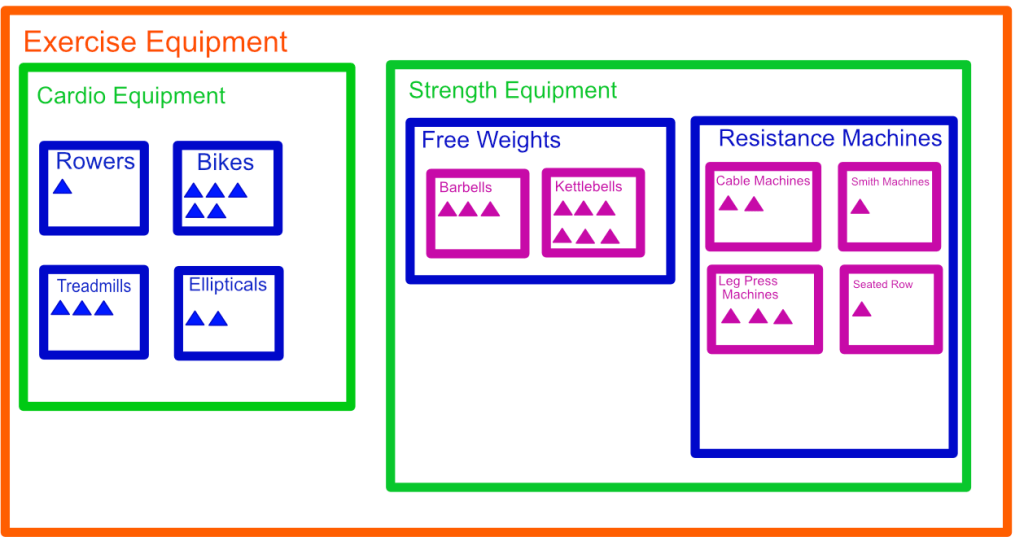
The parent asset category in this depiction is ‘Exercise Equipment’. Under ‘Exercise Equipment’ we have defined ‘Cardio’ & ‘Strength’ equipment respectively, and continue to subcategorize until we feel that we are at a level that will work for our needs.
The diagram does an okay job of showing how flexible this categorizing system is, but is missing a few things. For example, an asset can be defined directly under the ‘Free Weights’ category if it doesn’t make sense to go into a subcategory like ‘Barbells’ or ‘Kettlebells’, or any other one.
Categories can be made at will, and assets can be put into exactly what makes sense for the org.
At the same level as ‘Exercise Equipment’, a ‘Facility Equipment’ category could also be created. This category would include items like the air conditioner and other facility-related equipment not directly tied to exercising, allowing them to be tracked as assets as well.
Benefits
Categorizing assets in this way would give our hypothetical gym owner or manager a comprehensive overview of all the equipment, enabling them to inventory their assets and track maintenance needs effectively.
With this approach, we can now
- create maintenance schedules for each asset category
- analyze expenses associated with maintaining each category
Category Maintenance Schedules

Creating a maintenance schedule at the category level provides a quick and efficient way to manage recurring maintenance requirements. Imagine you run a go-kart track and you own 30 go-karts, manually setting up a recurring oil change for each go-kart individually would be impractical.
Instead, you can create a “Go-Kart” category and set the maintenance schedule for the entire category.
To go back to our gym examples
- Treadmills should have their belts inspected every 3 to 6 months.
- Barbells should be oiled every 1 to 3 months to prevent rust.
- [Insert Category] requires [specific maintenance] every [time interval] or [hours of usage].
By defining these schedules at the category level, maintenance tickets will be automatically generated based on each asset’s specific values (e.g., the last time the barbell was oiled).
This definitely makes life easier for managing any maintenance!
Money Talks
In addition to creating maintenance schedules for our asset categories, we can start to analyze various data points, such as the total value of our cardio equipment inventory and the expenditure on maintaining weight machines. This detailed view of maintenance expenses enables businesses to make more informed decisions, focusing on areas that provide the best value.

Conclusion
Implementing an effective asset categorization system streamlines maintenance management and enhances operational efficiency. By setting maintenance schedules at the category level and analyzing associated expenses, businesses can make informed decisions, ensuring optimal resource allocation and asset longevity.
I would love to hear your thoughts and ideas on how organizations can best utilize this system—please share your experiences or suggestions in the comments!
 EverMaintain Dev Blog
Leave a comment